Wireguard modified to support IPv6 SLAAC

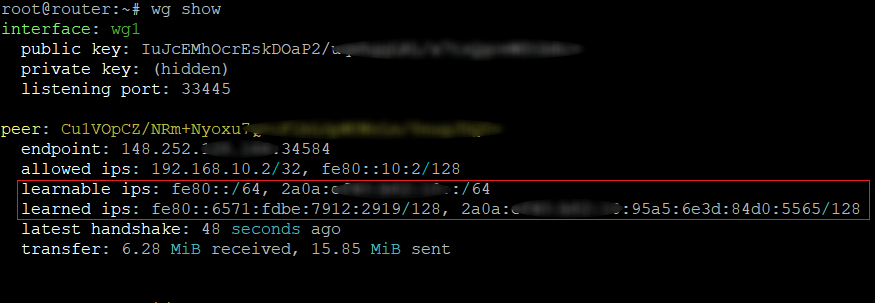
I said in my previous post that modifying the wireguard kernel module, with the help of AI, was for another day. Well, it didn’t take long before I wanted to give it a go. The eBPF fix for SLAAC on wireguard worked, just fine for me, but really felt too hacky. So, I took the wireguard source and told a combination of Gemini (mostly) and at times a bit of GPT5-mini what I wanted to do and let it have a go. The result was pleasantly surprising.

Version 1 – this reused the existing AllowedIPs trie. It seemed the obvious way to do it, simply get in where the current peer IP isn’t recognised and insert it into the trie, and from then on it all just works. Except, it’s not possible to update the trie there, it had to be delegated to a worker, so it leaves a window where we allow packets though, but don’t yet know how to route them back. Managing the arrival of multiple new addresses for a peer at once gets complicated, it’s harder to keep track of a list of per peer learned IPs for chucking the oldest when we reach our limit, etc. And the worst bit, we need a per device lock every time we learn an IP, so I had to debug multiple different deadlocks before finally getting something to work. But it did, and it worked well.

Version 2 – I decided there must be a cleaner way to do things, so explaining my concerns to Gemini, we had another go. This time we went for a separate hash table of learned IPs. On the surface this seems more complex, but it’s not really, it actually simplifies a lot. All our learned IPs are /128, so we don’t need to find matching prefixes, just matching values. We can update immediately, no deferred worker thread, we don’t need to lock the device each time, there are cleaner ways to track a per-peer list, etc. It keeps the learned IPs separate, meaning a bit more update to the wg userspace tool, but not a big deal. It felt like a bit more code, but gave neater separation of new functionality and only one deadlock needing fixing in the whole second version.

I’ve been running it for a while now, and it seems pretty solid. As before, the introduction of auto learning undermines the incoming filter element of wireguard’s AllowedIPs design, but that’s really by definition of auto learning.

Source code on Github: https://github.com/raburton/wireguard-slaac

Bringing SLAAC to WireGuard: A Vibe Coding Experiment

[ In keeping with the theme of the post, this article has been (almost entirely) written by AI. Basically I decided to test AI (Gemini) to see if it could do something useful for me, in an area I knew nothing about, and it actually did. ]

Source Code: https://github.com/raburton/wg-slaacer

WireGuard is an incredible piece of engineering—fast, modern, and significantly easier to manage than the IPsec/StrongSwan setup I previously used. However, while its simplicity is its greatest strength, that same design philosophy creates a unique challenge when it’s time to play with IPv6.

The Background: Why WireGuard Struggles with Dynamic IPv6

In the IPv4 world, we are used to scarcity. We assign a client a private internal address (like 10.0.0.2), NAT it, and call it a day. IPv6 changes the maths; we have addresses in abundance, and the standard way for a device to get one is SLAAC (Stateless Address Autoconfiguration).

The Problem: The “AllowedIPs” Routing Table

WireGuard doesn’t just use AllowedIPs for security; it uses it for routing. When the server sends a packet back to a peer, it looks at the destination IP and finds the peer whose AllowedIPs matches.

This creates a conflict with SLAAC:

  1. The /64 Requirement: SLAAC requires a /64 prefix to function.
  2. Overlap is Forbidden: You cannot have the same range in the AllowedIPs of two different peers.
  3. The Waste: If you have 10 clients, you’d technically need to give each their own /64 prefix. While I get a /56 from my ISP (256 prefixes), dedicating a whole /64 to a single phone is incredibly wasteful.
  4. No “Learning”: Standard WireGuard expects you to know the client’s IP in advance. SLAAC expects the client to pick it on the fly.

The Solutions?

  • Stick to Static IPs: Works, but you lose privacy extensions and the “plug and play” nature of IPv6.
  • One Interface Per Peer: Creating wg0, wg1, etc., is a management nightmare.
  • Modify the wireguard kernel module: In hindsight maybe not as difficult as I first assumed, esp if using AI, for another day…
  • Others: I found several other discussions online with hints at solutions, that ultimately made no sense in practice.

The New Solution: eBPF to the Rescue

If the WireGuard kernel module won’t learn IPs dynamically, I decided to teach it. How? I had ideas that didn’t work, and talking those through with Gemini it suggested using eBPF (Extended Berkeley Packet Filter).

How it Works

The solution consists of a C program that loads a kernel probe and a userspace daemon.

  1. The Kernel Probe (provisioner.bpf.c): This hooks into wg_allowedips_lookup_src. Every time WireGuard validates a source IP, our code triggers. It extracts the IPv6 source, verifies the packet came from our interface (e.g., wg1), and “walks” the kernel’s internal wg_peer structures to find the peer’s public key.
  2. The Userspace Daemon (provisioner.c): When the BPF code sees a new IP, it sends an event to this daemon. The daemon then calls the WireGuard Netlink API to dynamically add that specific /128 address to that peer’s AllowedIPs list.

Security and The “Learning” Model

Moving from a static model to a learning model changes the security contract, but for a home user with trusted peers, the risks are well-managed:

  • Cryptographic Enforcement: An attacker cannot just spoof an IP; the eBPF program only learns an IP if the packet has already been successfully decrypted by a peer’s private key.
  • DoS Protection: The code uses a token bucket to rate-limit how many new IPs a peer can register, preventing a buggy or malicious client from flooding the routing table.
  • Future Hardening: While not in the current version, “scoped learning” could be added to ensure the learned IP stays within a specific prefix. Furthermore, a firewall on the other side of the WireGuard interface can easily block any spoofing attempts into the rest of your LAN.

Reflections on “Vibe Coding”

This project was as much an experiment in “Vibe Coding” as it was in networking. As a programmer, I used AI to bridge the gap into the unfamiliar territory of eBPF.

I like to learn by example, and AI provided the direct, relevant examples I needed instead of requiring me to scrape documentation and examples for days. However, it wasn’t a “hands-off” process. I had to intervene frequently—debugging hallucinated kernel structures and refining the logic.

Without a programming background, I don’t think I could have steered the AI to this specific result. But with it, I was able to maintain the “vibe” of the goal while the AI handled the heavy lifting of the boilerplate. The result is a high-performance auto-provisioner that makes IPv6 on WireGuard feel as seamless as I had hoped it could be.
BT Infinity with IPv6 on Linux

If you’re building your own Linux based router to connect to BT Infinity you’ll probably want IPv6 working too. Address assignment works differently in IPv6 to IPv4 – we aren’t going to be given a single address we are going to be given a 56 bit prefix. From a 128 bit address that leave us a lot of bits available to use to address hosts on many sub-networks in our network. We are going to assign 64 bit prefixes to our interfaces (we can create 256 prefixes at 64 bits each) each with vastly more addresses than the entire IPv4 address space. To get our prefix from BT and delegate prefixes to our own networks we need an IPv6 DHCP client. This is where lots of other guides, forum posts, and the like, are a bit out of date (or don’t apply to BT Infinity) using wide-dhcpv6, dibbler, radvd, sysctl settings and custom scripts. Having played with various options I’ve found what works for BT Infinity in 2017, resulting in a really clean and simple method that boils down to a very simple configuration.

Continue reading “BT Infinity with IPv6 on Linux”

MTU 1500 for BT ADSL with OpenWrt

Just a handy tip if you’re using BT ADSL with an OpenWrt router. I didn’t know you could get an MTU of 1500 on ADSL. I have that on my Infinity connection at home, but it wasn’t until I played with the router at my Father’s that I found it was possible on ADSL too.

Why do you want an MTU of 1500? Without going into all the technical details of Ethernet, here is the simple version: Your home network (wired or wireless) is Ethernet based and as standard Ethernet uses packets of 1500 bytes but traditionally ADSL routers in the UK were configured to use 1492. This meant any time you sent a full size packet to the router, to forward on to the internet, it had to break it down in to two packets. This adds overhead and is inefficient, resulting in reduced throughput (slower speeds).

If you are using OpenWrt connected to a modem that supports an MTU of >1500 you can fix this. I suggest the OpenReach white modems originally provided for Infinity, which can also be configured as PPPoE modems to connect an Ethernet OpenWrt router to ADSL.

To get the MTU up to 1500 for the PPP connection you need to increase the MTU of network interface to 1508. That’s easy, simply edit the WAN interface in the OpenWrt Luci GUI (no need to edit WAN6 as well). Or edit /etc/config/network (example from Netgear WNDR3700, interface names will vary by device):


config interface 'wan'
  option ifname 'eth1'
  option _orig_ifname 'eth1'
  option _orig_bridge 'false'
  option proto 'pppoe'
  option username 'user@isp.net'
  option password 'password'
  option mtu '1508'

This will only set the MTU for the physical interface. The PPPoE connection will still use 1492 and there doesn’t appear to be any way to fix this in the GUI. So add the following to a new file called /etc/hotplug.d/iface/99-mtufix (you’ll need to connect via SSH to do this):


#!/bin/sh

[ "$ACTION" = "ifup" ] || exit 0
[ "$DEVICE" = "pppoe-wan" ] || exit 0

logger -t mtufix "Setting MTU of $DEVICE to 1500."
/sbin/ifconfig $DEVICE mtu 1500