Category Archives: Uncategorised

Bringing SLAAC to WireGuard: A Vibe Coding Experiment

[ In keeping with the theme of the post, this article has been (almost entirely) written by AI. Basically I decided to test AI (Gemini) to see if it could do something useful for me, in an area I knew nothing about, and it actually did. ]

Source Code: https://github.com/raburton/wg-slaacer

WireGuard is an incredible piece of engineering—fast, modern, and significantly easier to manage than the IPsec/StrongSwan setup I previously used. However, while its simplicity is its greatest strength, that same design philosophy creates a unique challenge when it’s time to play with IPv6.

The Background: Why WireGuard Struggles with Dynamic IPv6

In the IPv4 world, we are used to scarcity. We assign a client a private internal address (like 10.0.0.2), NAT it, and call it a day. IPv6 changes the maths; we have addresses in abundance, and the standard way for a device to get one is SLAAC (Stateless Address Autoconfiguration).

The Problem: The “AllowedIPs” Routing Table

WireGuard doesn’t just use AllowedIPs for security; it uses it for routing. When the server sends a packet back to a peer, it looks at the destination IP and finds the peer whose AllowedIPs matches.

This creates a conflict with SLAAC:

  1. The /64 Requirement: SLAAC requires a /64 prefix to function.
  2. Overlap is Forbidden: You cannot have the same range in the AllowedIPs of two different peers.
  3. The Waste: If you have 10 clients, you’d technically need to give each their own /64 prefix. While I get a /56 from my ISP (256 prefixes), dedicating a whole /64 to a single phone is incredibly wasteful.
  4. No “Learning”: Standard WireGuard expects you to know the client’s IP in advance. SLAAC expects the client to pick it on the fly.

The Solutions?

  • Stick to Static IPs: Works, but you lose privacy extensions and the “plug and play” nature of IPv6.
  • One Interface Per Peer: Creating wg0, wg1, etc., is a management nightmare.
  • Modify the wireguard kernel module: In hindsight maybe not as difficult as I first assumed, esp if using AI, for another day…
  • Others: I found several other discussions online with hints at solutions, that ultimately made no sense in practice.

The New Solution: eBPF to the Rescue

If the WireGuard kernel module won’t learn IPs dynamically, I decided to teach it. How? I had ideas that didn’t work, and talking those through with Gemini it suggested using eBPF (Extended Berkeley Packet Filter).

How it Works

The solution consists of a C program that loads a kernel probe and a userspace daemon.

  1. The Kernel Probe (provisioner.bpf.c): This hooks into wg_allowedips_lookup_src. Every time WireGuard validates a source IP, our code triggers. It extracts the IPv6 source, verifies the packet came from our interface (e.g., wg1), and “walks” the kernel’s internal wg_peer structures to find the peer’s public key.
  2. The Userspace Daemon (provisioner.c): When the BPF code sees a new IP, it sends an event to this daemon. The daemon then calls the WireGuard Netlink API to dynamically add that specific /128 address to that peer’s AllowedIPs list.

Security and The “Learning” Model

Moving from a static model to a learning model changes the security contract, but for a home user with trusted peers, the risks are well-managed:

  • Cryptographic Enforcement: An attacker cannot just spoof an IP; the eBPF program only learns an IP if the packet has already been successfully decrypted by a peer’s private key.
  • DoS Protection: The code uses a token bucket to rate-limit how many new IPs a peer can register, preventing a buggy or malicious client from flooding the routing table.
  • Future Hardening: While not in the current version, “scoped learning” could be added to ensure the learned IP stays within a specific prefix. Furthermore, a firewall on the other side of the WireGuard interface can easily block any spoofing attempts into the rest of your LAN.

Reflections on “Vibe Coding”

This project was as much an experiment in “Vibe Coding” as it was in networking. As a programmer, I used AI to bridge the gap into the unfamiliar territory of eBPF.

I like to learn by example, and AI provided the direct, relevant examples I needed instead of requiring me to scrape documentation and examples for days. However, it wasn’t a “hands-off” process. I had to intervene frequently—debugging hallucinated kernel structures and refining the logic.

Without a programming background, I don’t think I could have steered the AI to this specific result. But with it, I was able to maintain the “vibe” of the goal while the AI handled the heavy lifting of the boilerplate. The result is a high-performance auto-provisioner that makes IPv6 on WireGuard feel as seamless as I had hoped it could be.

x-rite RM200 Hacking

After a good tip on Hackaday I picked up an X-rite RM200. A tool with no real use to virtually anybody, yet has provided a huge amount of entertainment to me and at least a handful of others (and not by going around testing the colour of everyday objects).

The original hack for these was to intercept the update request (using Fiddler) and swap the serial number, to get hold of different firmware and colour fandecks. This allowed a cheap cosmetic model (which can be found on eBay, often very cheaply) to be turned into the more expensive regular model. Using the information provided, that took all of 2 minutes to do to my own one. After a further 2 minutes of playing with the upgraded device, I wanted to do something more fun with it. So, first job, set about improving the hack process. Instead of intercepting the request to monkey with, why not write my own server for the sync application to connect to, then I can feed it whatever files I want.
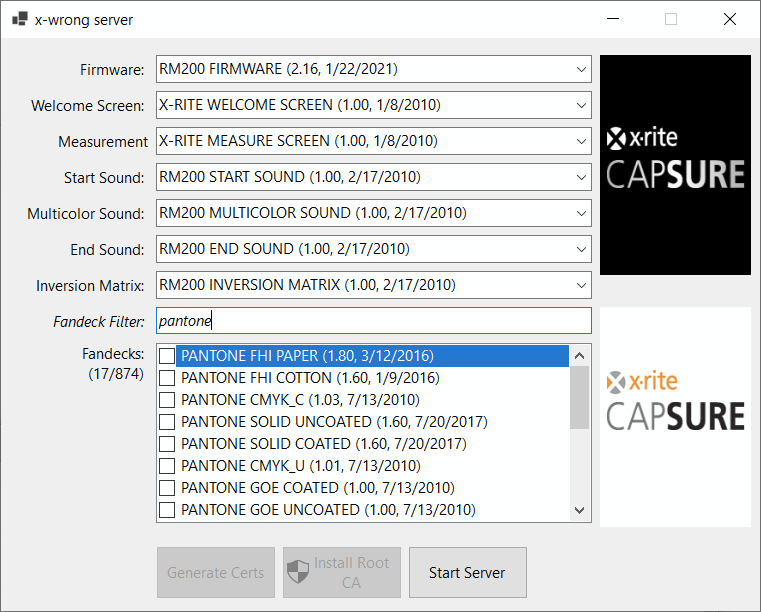
x-wrong, so wrong it must be rite

That turned out to be quite easy, so on to the next challenge… That’s when I stumbled on Ivor Hewitt’s blog, another keen hacker who had picked up an RM200 for the same reasons.

Lots of emails were exchanged and a lot was figured out. As Ivor had already opened his to connect up a j-link, and I wasn’t keen to do this to mine unnecessarily, this meant Ivor was taking most of the risk on the dicier commands. When bootloader SPI flashing was just about figured out, and tried with what turned out to be a bad bootloader image, it was bricked again and a lot of time went in to recovering it. This all turned out to be a bit of distraction as there is no real reason to want to flash the bootloader in the end, but it led to good hardware and software discoveries (see Ivor’s blog).

Ivor had started a Python library to connect to the RM200 from Linux, using traces from the sync tool. Although I dislike Python, it does seem like a fairly quick and easy way to start interacting with a USB device, so I did the same, and shared the functions I worked out – initially in the process of trying to find ways to get a clean bootloader dump, but also figuring out lots of other functions along the way. Ample log messages in the firmware made this job a hundred times easier. Email not being the easiest way to share and version code, I’ve put my own RM200 library on GitHub, and continue to add functions.
Allowing map modifications on Nissan Connect

The maps on the Nissan Connect aren’t great, if you look at the metadata on the sd card the actual data used in the latest version is always at least a year old. Another personal annoyance is that the maps think the speed limit on several roads around my house is 20mph, which is not true and never has been. I have over-speed warning turned on, so I get lots of annoying and incorrect warnings when driving near the house. I have no expectation that this will ever get fixed in the maps officially, so I started to wonder about fixing it myself.

Having looked at files on the sd card I’m not convinced that’s going to be very likely, unless there are some tools out there on the internet but a quick google hasn’t found anything. Possibly no one has made any effort to understand the maps because if you edit them they probably work on the system – the contents of the sd card appear to be signed. The file cryptnav/data/data/misc/sdx_meta.dat contains a list of files that are hashed (or in some cases just the first 2kb of them) and signed. These files look like they’re probably key to the rest of the map data, so it’s likely any change to the map data will break the signature. A file of md5 checksums for the nav application update files is also included in the hash list, to ensure they aren’t modified either.

Other interesting things of note in sdx_meta.dat is a start date (seems unnecessary) and an end date (happily this is blank so they don’t expire). Guessing from the acronyms, it also looks like there’s the option to tie the contents to an sd card (via cid) or to a specific vehicle (by vin), again these are both blank values so not currently in use.

In order to edit the maps we either need to sign the edited version (not possible without the private key) or bypass the signature check. The latter is easy. The signature is ultimately verified by the function BPCL_EC_DSA_Verify in /opt/bosch/processes/libosal_linux_so.so and the return code can simply be patched so it always returns 0 (success).

If you want to play with map modifications (please do, I want to know how to fix my local speed limits!) I have added a script to my lcn-patcher tool to modify libosal_linux_so.so for you. The patch will need to be tailored for each version of the library, as it will have been re-compiled with each version of the firmware. The patch currently works with firmware versions F16A, D554 and D605, and uses md5 to check the file before modification (it also makes a backup and there is a script to restore the backup). For unknown versions, it will copy it to the sd card so it can be analysed for patching. As always, you modify your head unit at your own risk!

Update: See here from some initial work on understanding the map data formats.

Santander to track customer location via mobile

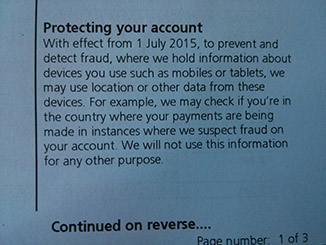
I found this interesting little note on the bottom corner of my latest Santander current account statement:

santander customer tracking by mobile and tablet

Protecting your account

With effect from 1 July 2015, to prevent and detect fraud, where we hold information about devices you use such as mobiles or tablets, we may use location or other data from these devices. For example, we may check if you’re in the country where your payments are being made in instances where we suspect fraud on your account. We will not use this information for any other purpose.

The simple example given sounds quite reasonable on the surface, as do most surveillance ideas, but:

  • Do we really need to be tracked everywhere we go by another party?
  • What “other data” are they planning on collecting, besides location?
  • What safeguards are there to protect this data?
  • How long will they keep this data?
  • How are they collecting this data? Do you need to have installed their app or will they be getting information from your mobile operator?
  • Who might they be forced to give this data to?
  • Will it just make another massive database that government agencies can access to get more information about persons of interest? I.e. does it just become another, privately operated, extension of government surveillance?
  • Where is the option to opt out?
  • Is it really even needed for the stated purpose? If they have your mobile number and spot a transaction they think is potentially fraudulent they currently call you to confirm it’s really you, which seems to work well when it’s happened to me.